 Sova
Sova

Sova · everyday planner for iPhone
Sova keeps everyone’s plans, so you don’t have to.
Shared lists for home and small teams, your calendars, and one calm day view, on iPhone. Paste a school email, a staff rota or a booking, and Sova Pro finds the dates and to-dos and suggests a shared list for each.
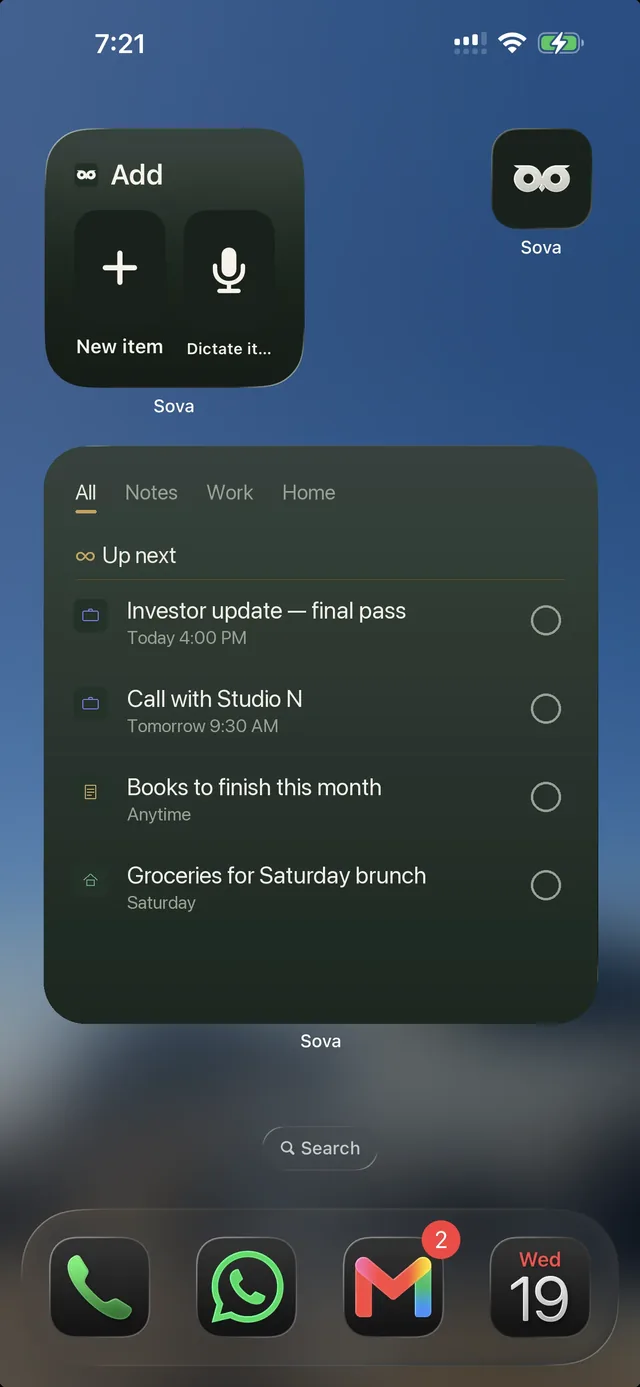
So you're not jumping between Notes, Reminders, and three calendar apps. Notes, to-dos, and your calendars from Apple, Google, and Outlook in one place. Check your day from the Home Screen widget.
Private plans stay on your iPhone, work offline, and share only the groups you choose.
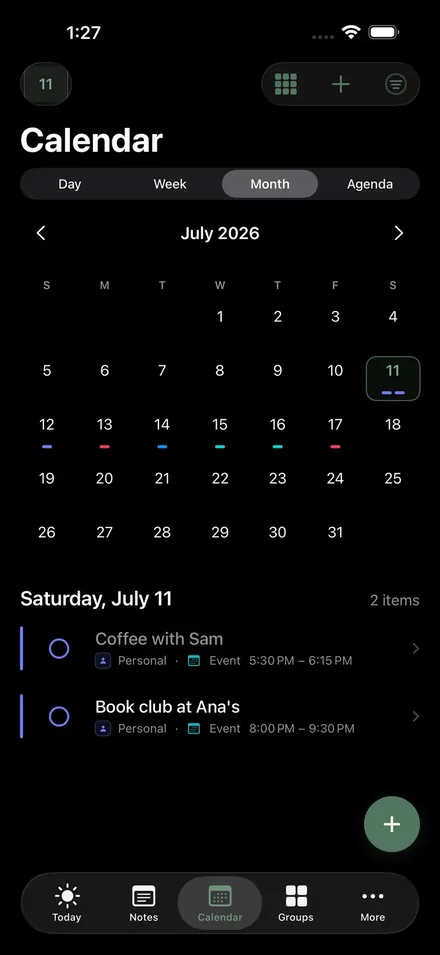
Free on the App Store · Personal plans work offline · Pro from $5.99/month or $47/year · Six languages · No ads
What Sova does
What Sova does
Capture it. Find it later.
Notes, tasks, the dentist in March, the packing list for next summer — keep the small things beside the plans they belong to.
Calendars, side by side.
Choose calendars and reminder lists already on your iPhone, then add supported calendar links when a service provides one. Work, home and travel can share one view without becoming one list.
Share only what belongs.
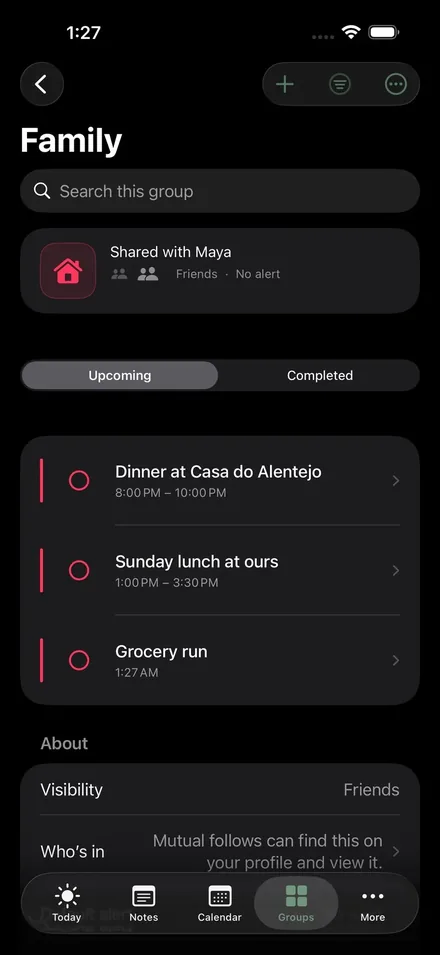
Avoid messy WhatsApp or Messenger threads for planning. Split life into Groups (Work, Friends, Family) and invite in one tap. Everyone sees the same list. You decide who can view or add.
Sova Pro
Messy in. Organised out.
Snap a photo, drop in a screenshot, or just talk. Sova turns it into a task, event, or note in seconds. Sharing text from an email or a web page is free and lands as a note or a list.
The widget
Your home screen becomes the planner.
Personal plans, work, family and friends are one glance away — the work call, the grocery run, the note you'd forget. See it, tick it, add the next one. Open Sova when you want notes, calendar, or the full group.
Two ways Sova fits
Two ways Sova fits
Everyday life
Personal notes, work, family and friends stay in their own groups, while your day and the Home Screen widget bring it together.
Notes · Work · Family · Friends
See everyday lifeTeams
Shared schedules, assigned work and practical tasks in one agenda — clear roles, one invite link or QR, and busy times only when someone grants them.
Schedules · Roles · Invites · Availability
See teams
Private by design
Clear boundaries, explained plainly
Private groups stay on your iPhone and work offline. Shared lists are stored online so invited members can see updates; they use encrypted connections and account permissions. No ads or cross-app tracking, and product analytics are optional.
The full policy, in plain words →Sova Pro
Free is complete. Pro takes it further.
Notes, your day, calendars, widgets and two shared lists are free, forever. Pro adds the screenshot and voice capture marked above, unlimited shared lists, availability sharing with more people, and photo attachments. One clear comparison, no asterisks.
Early access: Sova Pro is free until 15 November 2026 when you sign in. After that, Pro is $5.99/month or $47/year; your plans stay yours either way.
Compare Free and Pro →Questions
The nine things everyone asks
Is Sova Planner the same as other apps named Sova?
No. Sova Planner ("Sova: Planner & Shared Lists" on the App Store) is the everyday planner by Victor Nivelleau (1neurone). It is not affiliated with "SOVA – Stay Organized" (a focus timer), Sova dating, sleep, homework, or any other app named Sova.
What is Sova?
An everyday planner for iPhone. Personal notes, work calendars, family plans and trips with friends stay in separate groups, then come together in one view of your day and the large Home Screen widget. Share a group with one link and Sign in with Apple. No passwords.
How much does Sova cost?
Early access: Sova Pro is free until 15 November 2026 when you sign in. After that, Pro is $5.99/month or $47/year; your plans stay yours either way.
Notes, your day, calendars, widgets and two shared lists (up to 10 people each) are free forever. Sova Pro is $5.99/month or $47/year and adds screenshot and voice capture that fill in plans, unlimited shared lists, availability sharing with more people, and photo attachments.
How is Sova different from Reminders or an AI assistant?
Reminders is built for lists and quick tasks. Chat apps start a conversation. Sova is a planner: notes, calendars, and shared lists in separate groups, one calm view of your day, and a Home Screen widget. Most apps make you retype everything. Sova doesn't: shared text from an email lands as a note or a list, and with Sova Pro a photo, a screenshot, or a few spoken words turn into a plan in seconds. Not a chatbot.
Does Sova work offline?
Personal plans live on your iPhone and work offline. Shared lists need a connection for everyone to receive the latest changes.
Where does my data live?
Private groups stay on your iPhone. A shared list is stored online so invited members can receive changes; it uses encrypted connections and account permissions. There are no ads or cross-app tracking, and product analytics are optional.
How does sharing work?
Open a group, share its link or code. The other person opens the link, confirms with Sign in with Apple (no passwords) and they're in. No iPhone? They can join in a browser with a code sent to their email. You decide who can view, create, or manage. Built so you're not planning trips or groceries in messy WhatsApp or Messenger threads.
Can Sova turn a screenshot or email into a plan?
Yes, with Sova Pro. Screenshot Scan reads a booking or event screenshot (or a photo) and AI Dictate listens to what you say; Sova pulls out the title, time, place, and details and drafts a task, event, or note in seconds. Nothing is saved until you add it. Paste a school email or a staff rota and Sova Pro finds the dates and to-dos in it, up to 12 at a time, each with a suggested list. Screenshots, pasted text and transcripts are never stored. On Free, text you share from an email still lands as a note or a list. How Scan works →
Start with one note or one plan.
No account is needed for private planning. Share a group only when you want other people in it.