 Sova
Sova
We make Sova. Read this with that in mind. Competitor details are from public listings as of October 2026 and may change.
Two kinds of sharing, one Monday
Most couples need two different things from a shared calendar. For work, the other person only needs to know when you are busy, not what it is. For home, they need everything: the time, the place, the list, the tick.
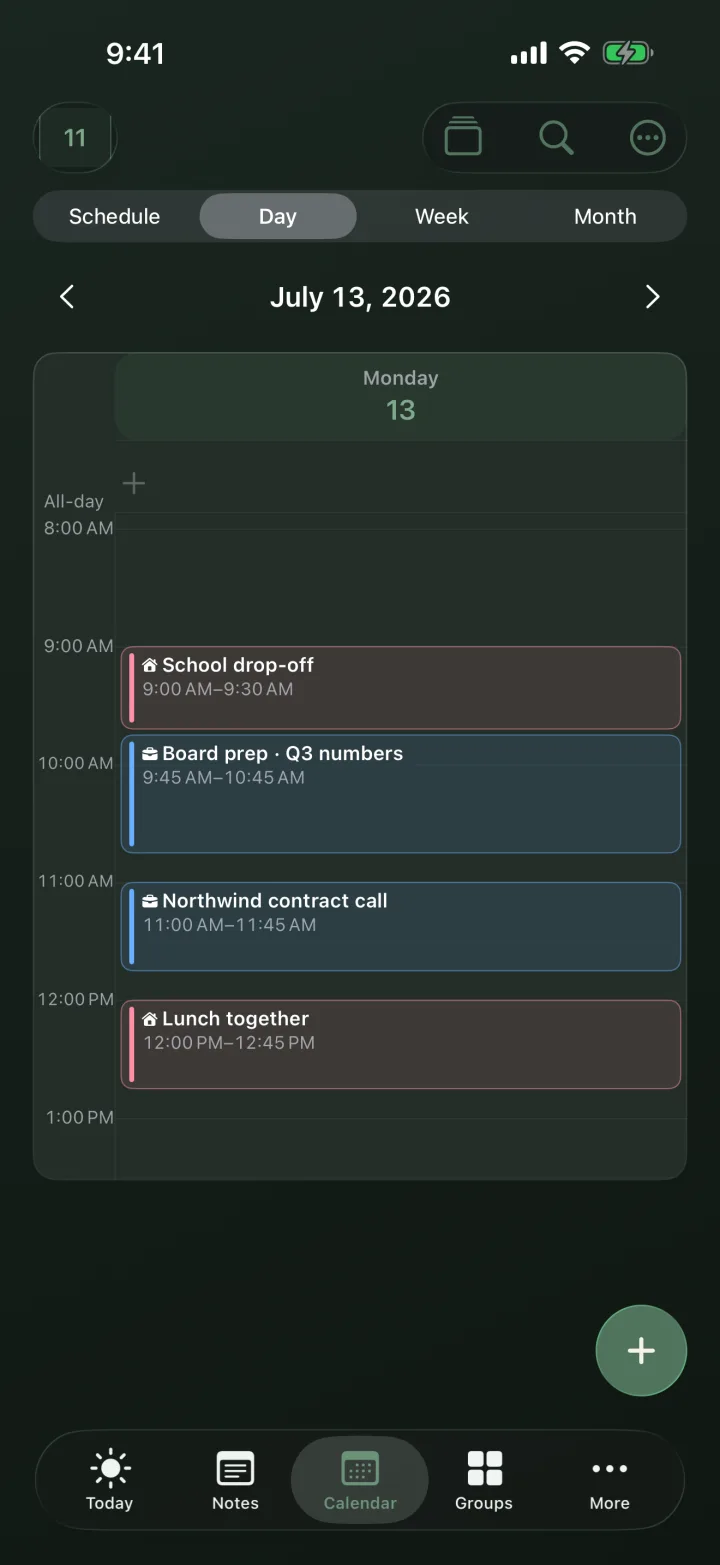
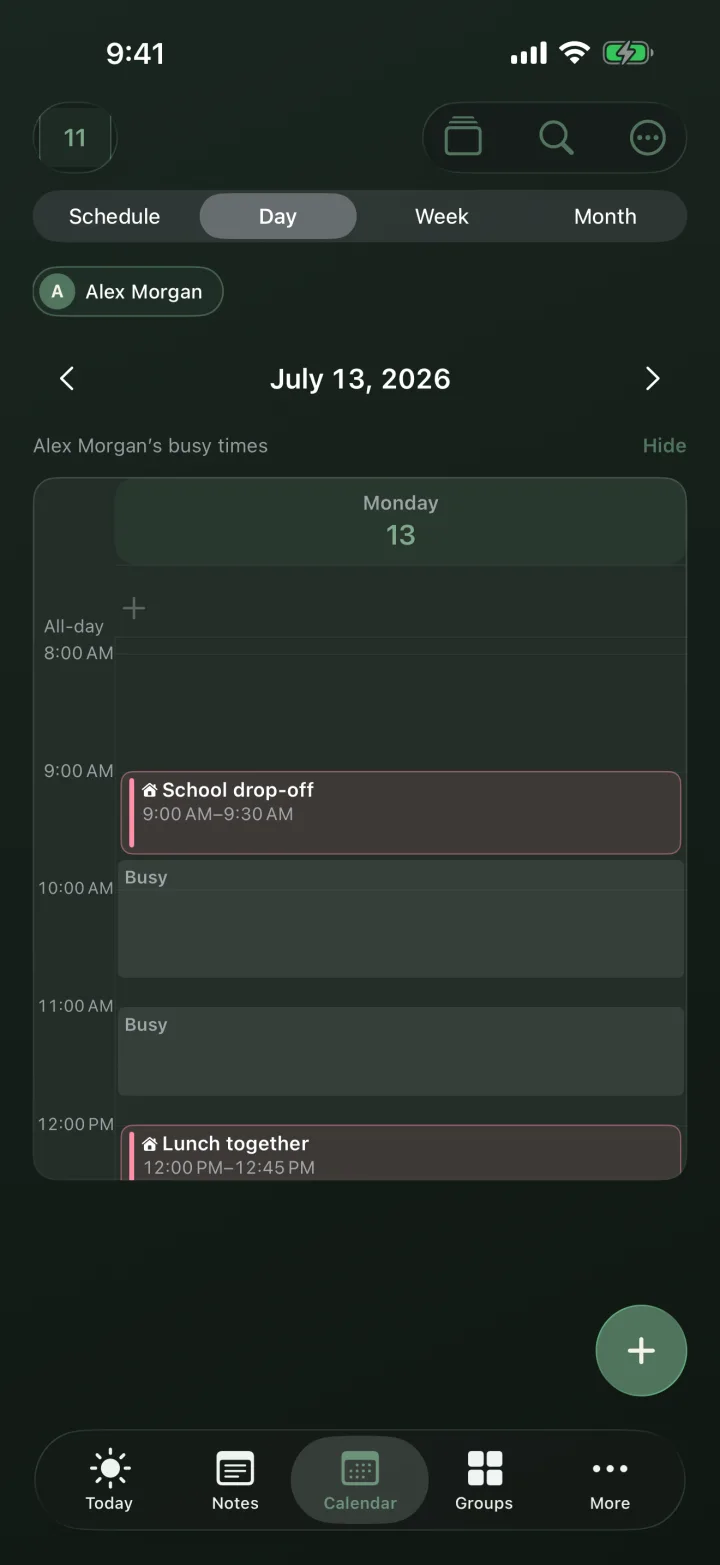
Nothing was shared twice here. Alex keeps his meetings in a private Work group. He switched Work on under Availability and chose Maya. His iPhone now sends only the start and end of each block, about three weeks ahead. Titles, places, the people he meets and his notes stay on his phone. Meetings less than 15 minutes apart arrive as one block, so even the shape of his day gives little away. Maya tapped Show once, and his busy times appear on her Calendar.
What stays private, what is shared
Stays on Alex’s iPhone
- Meeting titles and notes
- Places and video links
- Who the meeting is with
- The name of the group
- Everything in groups he leaves off
Maya sees as Busy
- Start and end times from the groups Alex switches on
- About three weeks ahead
- A whole day as Busy all day or Away, only if he chooses
- On her Calendar and in Find a time, never on Today or widgets
Shared in full
- Plans together: school runs, lunches, dinners
- The grocery list, ticks included
- Bills and errands
- Both add, edit and tick
The two shares never mix. Every group starts off for Availability, so nothing counts as busy until you switch it on. All-day events stay hidden unless you choose Busy all day or Away for that group.
Shared in full: the home
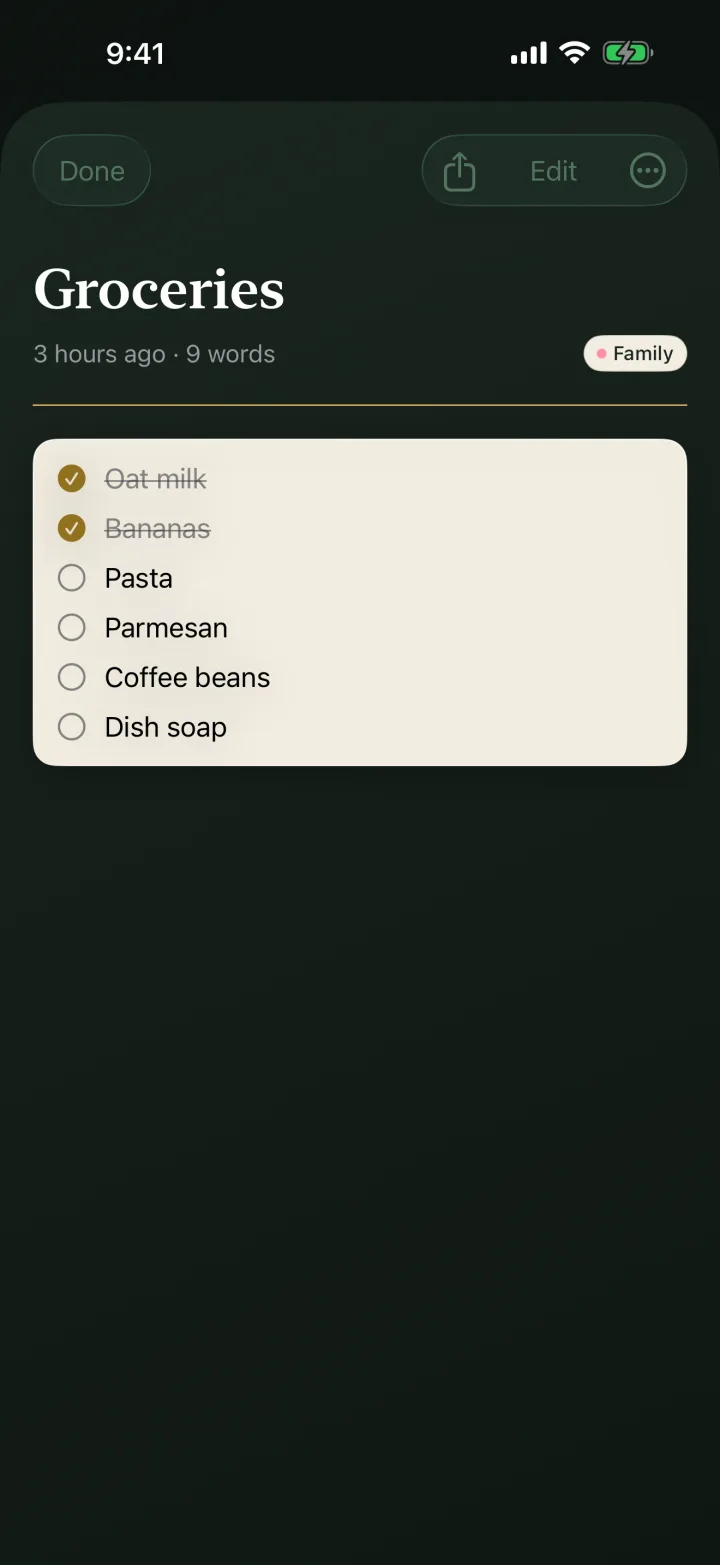
The Family group is an ordinary shared group. Maya and Alex both see every item with its title, add their own, and tick things off in the app or from the Home Screen widget. The grocery list is a note with checkboxes, so the shop is one tap per item, not a message thread.
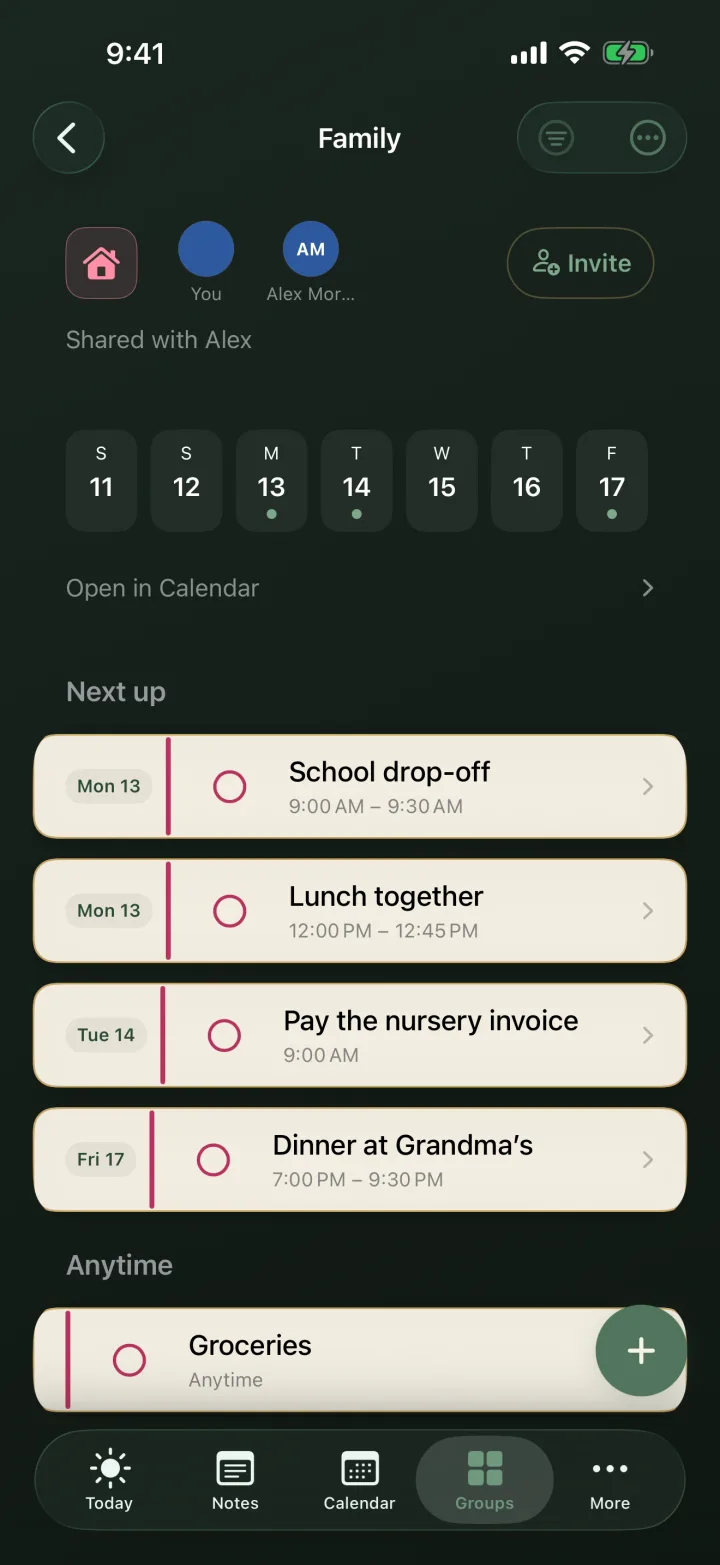
A group is not limited to two people. Invite a grandparent or the babysitter to Family with a link or a QR code, and they get the pickups, not the workday. Someone without an iPhone can join a shared list in the browser. New to this? Start with how couples share a calendar.
Set it up in two minutes
1) Keep work in its own private group. If your meetings live in Outlook or Google, add that calendar under Your calendars and attach it to Work, and those meetings count too. 2) Both of you sign in, with Apple or an email code. Go to More → Settings → Availability, tap Share with… and pick your partner. 3) Under Groups, switch on Include Work. Leave Family off: it is already shared in full. 4) Your partner taps Show once. Do the same the other way round, and Find a time suggests a slot when you are both free.
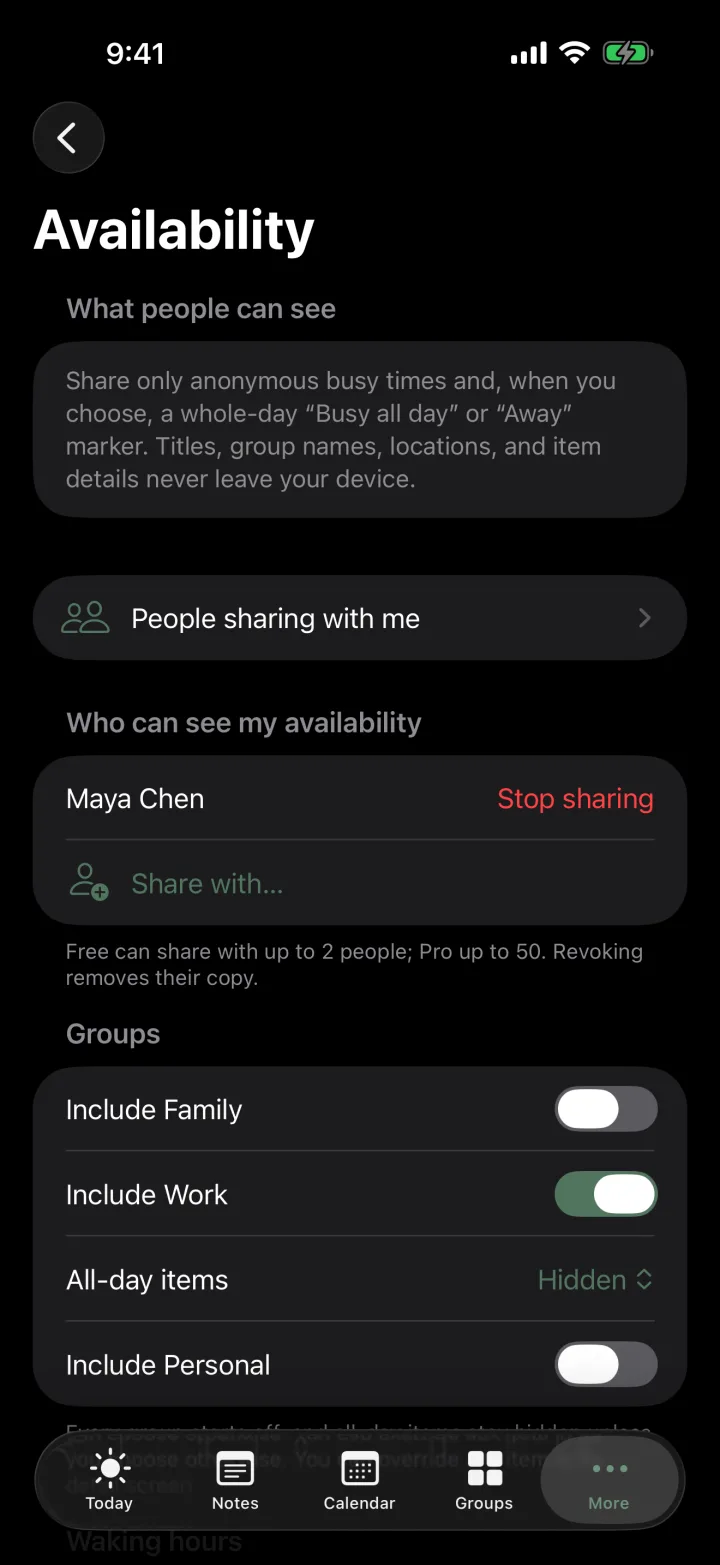
One thing not to do: do not invite your partner into the Work group itself. A shared group shows everything in full, titles included. Availability is the way to share work.
Where Cupla is the better pick
One of you uses Android. Cupla has apps for both. Sova is an iPhone app: a partner on Android can join a shared list in the browser, but cannot see your busy times.
You want both full calendars side by side. Cupla shows your two calendars next to each other and lets you choose, calendar by calendar, whether your partner sees the details or just busy. Sova never shows your partner’s own calendar entries, only their busy times and what you share in groups.
You want help with dates. Cupla has a date planner, date goals, wishlists and countdowns to the days that matter. Sova has none of that built in. Cupla’s free plan shows only a limited window of your partner’s events; Premium is one subscription for both of you.
Where Sova is the better pick
Work cannot leak by accident. Availability has no setting that sends details. It can only send times, from the groups you switch on.
Home is shared in the same app. Events, the grocery list, notes and checklists live in one group you both edit, with a calm Today view and a Home Screen widget.
More than two people. The same group can include a grandparent or a babysitter, and each person sees only the groups they are in.
Free covers a couple. Share busy times with up to 2 people, and use two shared lists of up to 10 people each, with no ads. Pro is optional: it shares busy times with up to 50 people, removes the list limits, and adds Screenshot Scan and Dictate.
At a glance
| Cupla | Sova | |
|---|---|---|
| Phones | iPhone and Android | iPhone; a partner without one can join a shared list in the browser |
| Your work calendar | Side by side; per calendar, details or just busy | Busy blocks only, from groups you choose; titles never leave your phone |
| Shared home items | To-dos, grocery list, wishlists | Shared groups: events, lists, notes and checklists that you both edit |
| Beyond the couple | Built for two | Invite family or a sitter to any group |
| Dates and occasions | Date planner, goals, countdowns | Not built in |
| Free plan | Your calendar; a limited window of your partner’s | Busy times with 2 people, two shared lists, no ads |
Questions couples ask
Can my partner see my work meetings in Sova?
Only as Busy blocks, and only from groups you switch on under Availability. Titles, places, notes and who you meet never leave your iPhone.
Does my partner need Sova to see when I’m busy?
Yes. You both sign in, you share, and they tap Show once. Your busy times then appear on their Calendar in Sova.
Is Sova on Android?
No, Sova is an iPhone app. A partner on Android can still join a shared list in the browser.
Is sharing busy times free?
Yes. Sova Free shares your busy times with up to 2 people. Pro raises that to 50.
Can we share groceries and plans too?
Yes. Invite your partner to a group like Family or Home. Everything in it is shared in full, and you can both add, edit and tick.
Pick Cupla if one of you is on Android, or you want both full calendars side by side and a date planner. Pick Sova if work should reach your partner only as Busy while home is shared in full, in one calm iPhone app. Sova Free covers both of you.